About the Tutorial
This tutorial is following the workflow that is used to move the World Catalogue of the Curculionidae: Lixinae: Cleonini by Massimo Meregalli into TaxonWorks.
The Cleonini Catalogue was previously published as a website (html), but each genus was also summarized in a PDF file identical to the respective webpage.
It is an excellent example of a richly annotated catalog, many other catalogs contain fewer citations for the information they provide. However, it would profit from living in a database such as TaxonWorks, where the data is much more manageable, interlinked and filterable.
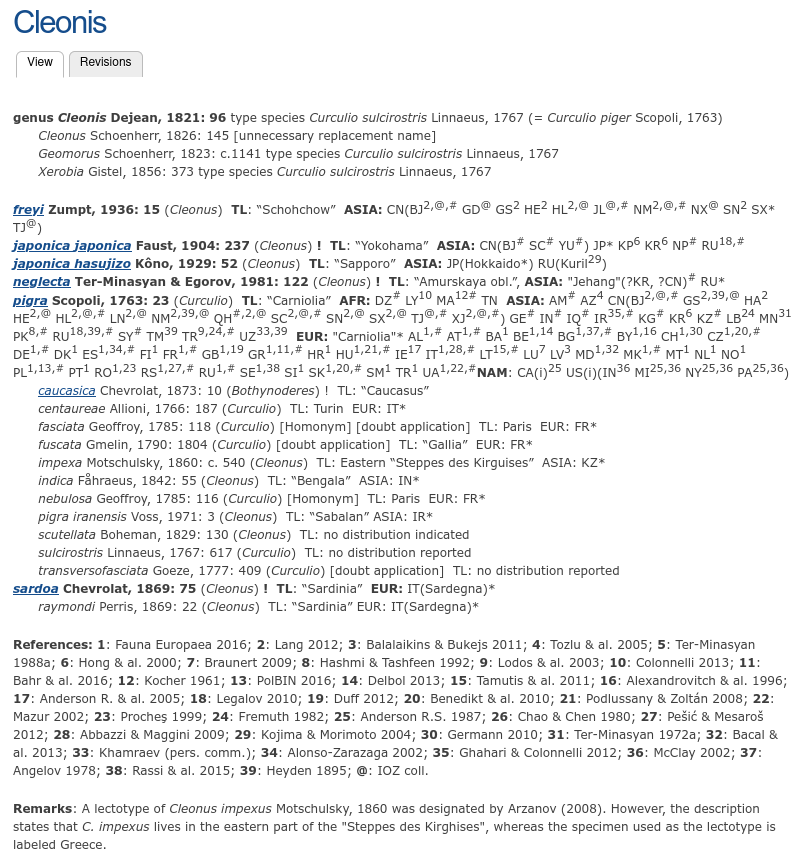
We see a lot of information that needs to be transferred into TaxonWorks:
- Names for genus, subgenus and species, including synonyms. Synonyms can have a status e.g. as homonym
- Citation for original description, with page number
- Images, usually depicting a type specimen
- Original genus for names that where described in a different genus
- Type locality, sometimes in verbatim ("Steppes des Kirguises")
- Asserted distribution: List of countries/provinces from which the species was recorded, with citation.
- Type seen by Massimo Meregalli ("!")
- Verbatim text ("Remarks: A lectotype [...]")
All of this is extremely valuable information and easily represented in the data model of TaxonWorks. On top, we will add the following whenever possible:
- host plants
- subsequent combinations (combinations between genus and species that where used after the original description but before the one that is currently used), with citation
- identification keys
- much more possible: DNA, morphological traits, etc...
Can I import an existing dataset instead of doing everything by hand?
Yes, definitely! But your dataset needs to be in a structured format. Most existing catalogs are in a verbatim format that is difficult to transform into a structure that can be imported into TaxonWorks. However, one strength of TaxonWorks is that you can export your data in a structured format, making it easier to move it to any other application. Adding data to TaxonWorks is "mobilizing" it for future use.