Understanding TaxonWorks
Why TaxonWorks?
Working in TaxonWorks creates a highly interlinked data network, that can be queried for almost everything. EVERYTHING you put into TaxonWorks can and should be backed by a citation.
More information can be found in About the Tutorial.
Cards: Tasks and Data
The tools of TaxonWorks are organized in cards: Task cards and Data cards.
You can scroll through cards using the arrow buttons for right and left. You can also search for text (name and description) or sort them by category.
In this video, I'm searching for the "New Taxon Name" Task and add it as a favorite for quick access.
Don't be overwhelmed by the large number of cards. Most of them are the solution for very specific problems, and you'll probably need to use only a handful of them.
The OTU
This is THE most important concept to understand about TaxonWorks: Taxon names and the "taxon itself" are stored seperately. It makes a lot of sense to do so, as a taxon (called "Operational Taxonomic Unit, OTU") is not the same as its name. Usually, an OTU is just representing (=linked to) a taxon name that is placed in a taxonomical hierarchy. However, you could also create an OTU like "thin-leaved species of Salix" to represent the biological association between a weevil species and a host plant that wasn't accurately identified. A collection database may need an OTU such as "unsorted beetles and flies".
What you need to remember about Taxon Names and OTUs:
Never create an OTU without a taxon name, never create a taxon name withouth an OTU. The database can contain bare OTUs without a taxon name and vice versa, mainly from imports. An OTU without a taxon name is not placed in the taxonomic tree, and a taxon name without an OTU cannot be linked to anything biological, it will only exist as a name.
Data Structure
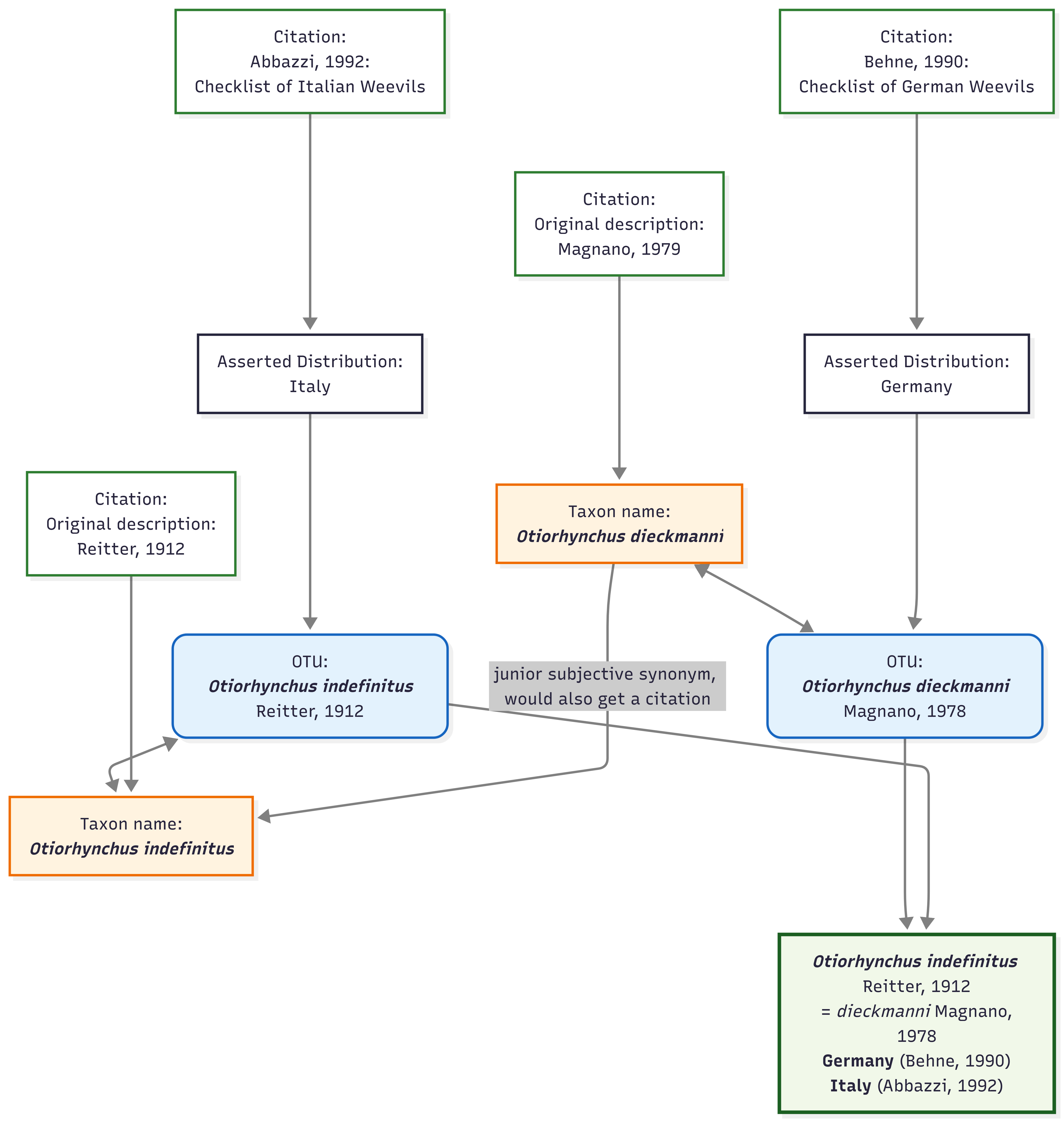
Don't think about the data structure as a table, think about it as a network or graph. Keep in mind, not only valid species name have an OTU, subjective synonyms keep their own OTU but the data gets summarized for both of them. Therefore, you can add information from literature to synonymized names. Who knows, maybe the name gets resurrected in the future?
When adding information, imagine attaching new nodes to the network. Don't worry, this looks very complicated but in TaxonWorks it isnt!
Tips & Tricks
- You can have several tabs of TaxonWorks open in the browser at the same time. E.g. if you notice you need a source that is missing, open "New Source" in a new tab, create the source, then proceed in the other tab where you left.
- Use the pinboard when you find youself citing the same few sources over and over.